Home › Poster maker › Home tuition poster
Home tuition poster maker with QR code
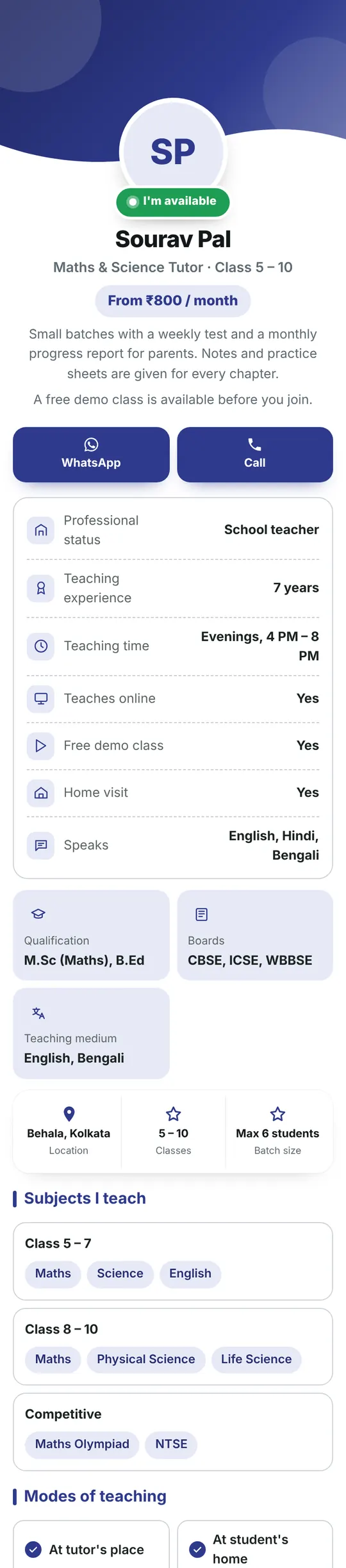
Make a tuition poster for your area with a QR code on it. Parents scan to see your subjects, fees, batch timings, results and a WhatsApp button.
Free forever · Ready in 5 minutes

What to put on your home tuition poster
- Classes and subjects you teach (e.g. Class 1–10, all subjects)
- Batch timings and home or centre classes
- Fees per month, or “call for fees”
- Your qualifications and years of teaching
- Your phone number and area or landmark
Keep the poster short and easy to read from far away. Put the rest, like photos, full prices and a map, on the mini website behind the QR code.
Your poster opens a free mini website at minipage.me/tuition with:
- About
- Subjects
- Fees
- WhatsApp and call buttons
- Map and address
How to make your home tuition poster
Make a poster with its own mini website in 4 simple steps.
- 1Choose a templatePick a ready-made poster for your business or need.
- 2Add your detailsYour name, offer, photos, prices and contact number.
- 3Get QR + mini websiteA short link and QR code are made for you, free.
- 4Download and printA print-ready PDF poster in A3, A4, A5, A6 or Letter.
Where to put it
Put your home tuition poster where people already look. They scan it, open your mini website and contact you.
Questions
What should I write on a home tuition poster?
Keep it short: classes and subjects, your area, one or two strong points (like “experienced teacher” or “monthly tests”), and your phone number. Put fees, timings and results on the mini website behind the QR code.
Can parents contact me on WhatsApp from the poster?
Yes. The QR code opens your mini website, which has a WhatsApp button and a call button.
Can I change my fees after printing?
Yes. Edit your mini website any time. The QR code on the printed poster keeps working and shows the new details.
Which sizes can I print?
A3, A4, A5, A6, Letter or Legal, in colour or black and white. You also get a PNG to share on WhatsApp.